The box at the top of the home page starts a conversation with Platix.io. One box handles all of it: ask a travel question, describe a trip you'd like planned, or paste a plan you already have to check it.
What can I type in the home page box?
Anything about travel:
- A question, such as "Is Kyoto worth it in August?". Platix.io answers in the conversation.
- A trip idea, such as "Five relaxed days in Lisbon with a day trip to Sintra". Platix.io plans it. See Plan a trip with AI.
- A plan you already have, pasted day by day. Platix.io checks it as written. See Check an itinerary.
Select Plan my trip to send. The conversation opens over the page, and the composer then reads Ask, describe a trip, or paste a plan. A long paste shows as one card that you can open with Show as text; add a question about it if you like, then send.
Select Plan with AI or Import an itinerary further down the home page to get to the same box.
How does Platix.io know what I want?
It reads your words first. When they're clear, it acts straight away: it answers a question, starts planning an idea, or checks a plan.
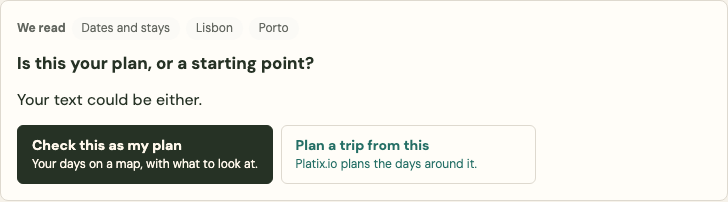
When your text could be either a plan or a starting point, it asks once before doing anything. The card reads Is this your plan, or a starting point? and offers Plan a trip from this or Check this as my plan. If you pasted on the Trip Check page but asked for a new plan, the choices follow your words: for example, Plan a new trip from this or Check my plan as it is. Nothing starts until you choose, and your choice then shows as You chose: ….
How do I add a PDF or a link?
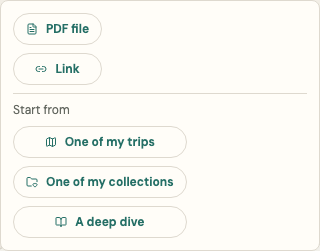
Select + beside the box, then PDF file or Link. Platix.io reads it into a card first, so you see what it read before you send it. Adding a PDF or a link needs you to be signed in; you can always paste the text instead. See Import an existing itinerary.
How do I start from a trip, a collection or a deep dive?
Signed in, select + and then, under Start from:
- One of my trips opens that trip with its copy dialog ready, so you can plan a new version without changing the original.
- One of my collections opens the collection in Explore with Create trip ready. See Create a trip from collections.
- A deep dive opens your deep dives, where Make it a trip turns a deep dive's itinerary into a trip. See Make a trip from a deep dive.
Where is the map?
On a wide screen, a map opens beside the conversation once an answer or a plan has places in it. Select a place in an answer, or Show on map on a checked plan, to see it there. On a phone, a Map button appears in the conversation's header instead.
How do I go back to an earlier conversation?
Signed in, select Recent conversations in the conversation's header and choose one. New conversation (the pen icon) starts a fresh one; the earlier one stays in Recent conversations. Select × to go back to the home page.
What happens to my conversation?
The conversation is kept like Platix.io's other public chats: in your account if you're signed in, or for up to 30 days in this browser if you're not. See Who can see my chat about a public trip or collection? for how long each is kept.
When you're not signed in, the line under the box explains that sending confirms you're 18 or older and agree to the Terms and Privacy Policy. Your first message runs a security check.
Don't put passwords, payment details, passport numbers or other sensitive personal data in the box.