Booking details keep practical travel records beside the stop where you will need them.
Add booking information
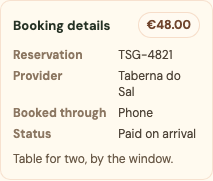
Open a writable stop and edit its booking details. Depending on the reservation, you can record:
- Reservation or confirmation number.
- Provider or operator.
- The service used to make the booking.
- Payment status.
- Cost and currency.
- Private booking notes.
- Receipt, confirmation, ticket, or reservation screenshots.
Use this for accommodation, transportation, activities, and other reserved stops. Leave fields empty when they do not apply.
Add a receipt or screenshot
Expand Booking and cost while adding or editing a stop. Under Receipts & screenshots, choose one of two actions:
- Choose photo opens the device's photo library or file picker. Use it for screenshots and images already saved on the phone.
- Take photo asks a supported mobile browser to open the rear camera. Use it for a paper receipt, ticket, or confirmation shown at a counter.
Platix compresses large phone images before upload while keeping enough detail for booking text. You can attach up to six images to one stop. After an image finishes preparing, save the stop to finish attaching it.
Select an attached image to enlarge it. To remove one, edit the stop, remove the image, and save the stop again.
Treat the fields as sensitive
Reservation numbers and private notes may allow someone to identify or alter a booking. Keep the trip private while adding them, and grant editor access only to people who should be able to change the trip.
Receipt images follow the same private boundary as the other booking fields. Platix does not send booking details or attachment metadata to anonymous visitors, public viewers, or read-only collaborators. The image bytes also require owner or editor authorization; they are not protected only by hiding thumbnails in the interface.
People with editor access can view and change booking attachments because they can edit the trip. Remove editor access when someone no longer needs those records.
Before publishing
Changing a trip from private to public shows a warning to review booking details, costs, private notes, and chat. Complete that review even though Platix keeps those planning fields out of the public trip.
Do not put sensitive information into the public trip title, public description, day title, stop title, or the ordinary Photos & video area. Those fields are intended to be visible with the itinerary. Put receipts and reservation screenshots only under Booking and cost.
Costs are records, not payments
Platix stores cost information for planning. It does not process the reservation, verify the price, or complete payment with the provider.