Platix.io can plan the days of a trip for you: put the stops in a sensible order, give them times, and add meals and the travel between towns. It does this when you plan a trip from an idea or a deep dive, and when you ask it to on a trip you wrote yourself.
How do I get Platix.io to plan the days of my trip?
It depends on where the trip came from:
- A trip idea typed into the home page box is planned as soon as Platix.io has chosen the route. See Plan a trip with AI.
- A deep dive's itinerary is planned when you select Make it a trip or Add to a trip. See Make a trip from a deep dive.
- A trip you wrote, whether you saved a plan as written, imported it or added stops yourself, shows a short strip at the top of the itinerary, “Your days are as you wrote them”, with Fill the gaps. Select it to have Platix.io plan the days around your stops. The i button beside the strip's title explains both buttons.
What does Fill the gaps do?
Fill the gaps times your days, adds meals and the travel between towns, and keeps every stop you wrote. It's offered once the trip has at least one stop of your own and nothing is planning yet.
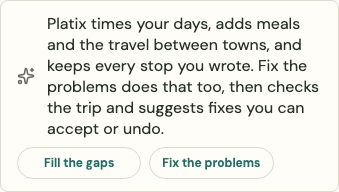
Fix the problems sits beside it. It does the same, then reviews the trip and suggests fixes you can accept or undo.
What happens while my days are planned?
At the top of the trip, Planning your days shows how many are done, for example 2 of 5 done. It usually takes a minute or two.
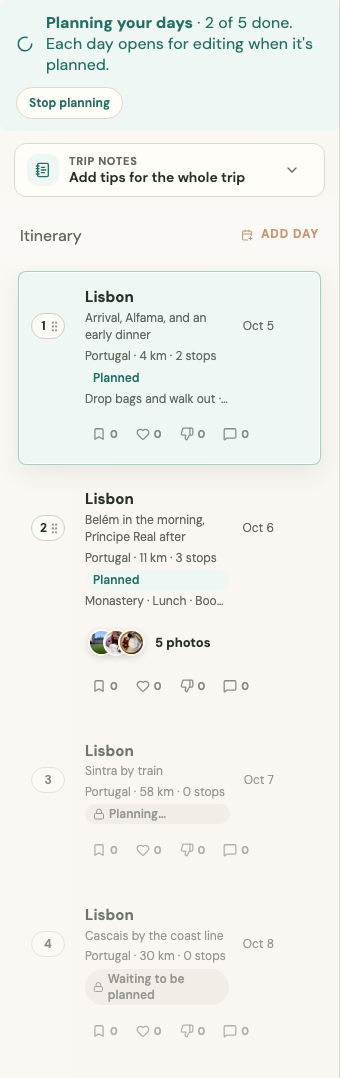
- Each day shows Waiting to be planned, Planning… or Planned. A day opens for editing once it's planned.
- You can read the whole trip meanwhile and edit the days already planned, from the page or from trip chat. Days still waiting or planning can't be changed, and nor can the trip's days and dates as a whole: adding, removing or moving days and changing the dates wait until every day is done.
- Stop planning ends it straight away. Days not planned yet stay as they are and open for editing.
If Platix.io can't plan a day, the day says Couldn't plan this day's times. It's as the itinerary has it. If planning takes much longer than it should, every day not planned yet opens as it was. You can always delete the trip, even while it's being planned.
There's a limit on how many trips can be planned at once and in a day. If you reach it, Platix.io says so, for example "Your other trips are still being planned".
What does a planned day look like?
- Order and times: the day's stops in an order that saves travel, each with a start time and how long it takes. When the trip has dates, the times follow each place's opening hours on those days.
- Nights: each day ends where you sleep. When nothing says where that is, the night is left for you to set.
- Leaving: when the first stop is a while from where you're staying, its note says when to leave, for example "Leave Gion about 08:40 (35 min to get there)."
- Moving between towns: a day that moves on gets a Travel to … row, for example Travel to Córdoba, saying where from and Google's estimate by train or bus, or by car. Google can miss fast trains, so check train times too. Lunch comes before a long journey.
- Evenings: stops best seen at dusk or at night, such as a viewpoint, come last. A stop that doesn't fit stays on the day with no time, marked If there's time.
- Meals: lunch and dinner at the usual local times (later in Spain, for example), named after the place they're near, such as Lunch near Kodai-ji. Dinner is near where you sleep that night, or the day's last stop. A meal that can't fit near its usual time has no set time. A long hike or outing that runs through lunch gets a Packed lunch instead.
- Free time fills a long gap with nothing else planned.
How do I choose where to eat?
A planned meal can show Places to choose from: restaurants Platix.io picked near the day's stops, open at that time and rated 4.0 or more, with how many minutes they are on foot. Select Choose to make one the stop, and Change to see the picks again. Or leave the meal as it is and decide on the day.
Only people who can edit the trip can choose.
Why is Platix.io asking me a question on my trip?
Instead of stopping to ask while it works, Platix.io sometimes makes a sensible choice and asks you about it afterwards, at the top of the itinerary. For example, when part of a pasted plan didn't fit a day, it says where it put it. Choose an answer, or select Answer in your own words. A note that only needs reading has Got it. When there are several, they show one at a time, with a count such as “2 things we assumed · 1 of 2” and arrows to move between them.