A deep dive's Itineraries suggest ways to spend your days there, from the shortest to the longest. Platix.io turns one into planned days: the order, the times, where to eat and what to book, using only the deep dive's places.
How can I use a deep dive's itinerary?
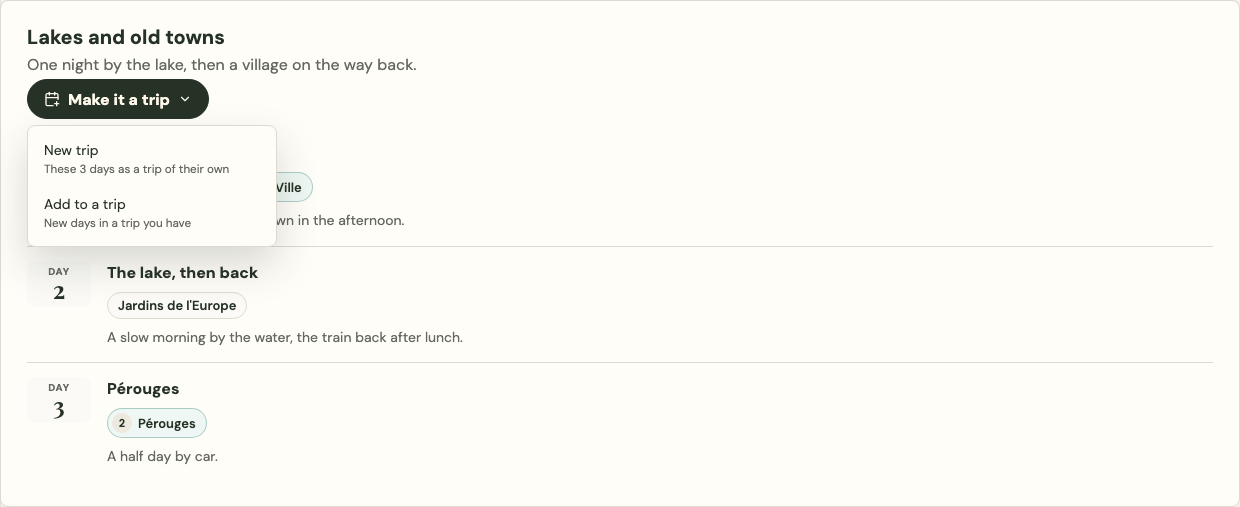
Select Make it a trip on the itinerary, then choose one of two ways:
- New trip makes the itinerary a trip of its own. See [How do I make a new trip from an itinerary?](#how-do-i-make-a-new-trip-from-an-itinerary)
- Add to a trip adds its days to a trip you already have. See [How do I add the days to a trip I have?](#how-do-i-add-the-days-to-a-trip-i-have)
On a public deep dive, Plan a trip to … at the top of the page is something else: a fresh plan for the place, not one made from an itinerary. See [What does Plan a trip do on a public deep dive?](#what-does-plan-a-trip-do-on-a-public-deep-dive)
How do I make a new trip from an itinerary?
Choose New trip under Make it a trip, check the details, then select Create trip:
- Open the deep dive and go to Itineraries. When the deep dive fills the window and on a phone, it's a section of its own. Beside the chat, it's under the Places tab.
- On an itinerary, select Make it a trip, then New trip.
- Check the Trip name. Under Dates, pick the first day, or leave it open. Each day of the itinerary follows the first.
- With no dates, choose the Month the trip is for, from the months the deep dive has researched. It starts on the month you're viewing. Platix.io plans for that month's weather, events and bookings.
- When that month has a Before you go list, leave Add the … Before you go list to the trip's notes ticked to copy it into the trip's notes.
- Select Create trip.
The trip opens straight away, with the itinerary's days, nights and stops as the deep dive has them. Make it a trip shows only on itineraries planned day by day.
If you've made a trip from the same itinerary before, the dialog links to it. You can still make another.
How are the days planned?
Platix.io plans the days one at a time, under Planning your days from the deep dive at the top of the trip. You can read the trip and edit the days already planned while the rest finish, and Stop planning ends it. Let Platix.io plan your days explains what happens while it plans, what a planned day looks like, and how to choose where to eat.
From a deep dive, Platix.io also:
- Uses only the deep dive's places and highlights for each day. It never adds a place the deep dive doesn't have.
- Reads each day's night from the itinerary, including one mentioned only in a day's notes ("sleep in Seville").
- Puts a stop the deep dive says to visit early first in its town. When the day only gets there later, the go-early tip is left out.
- Plans one of a set of alternatives (one walk or another, a harder route only if you want it) and lists the others in its note, for example "Or instead: Vallon via ferrata (half day to full day)". Ask the trip's chat to swap one in.
- Says what to book and how early on a stop that needs booking, as the deep dive has it, and adds a dish from the deep dive to try in a meal's note.
You can have two trips being planned at once, and start up to 12 plans a day. Past that, the trip is still made, or the days still added, as the itinerary has them, and the trip's overview says so.
How do I add the days to a trip I have?
Choose Add to a trip under Make it a trip, then pick the trip and where the days go:
- On an itinerary, select Make it a trip, then Add to a trip.
- Under Trip, pick the trip. Under After, pick the day the new days follow.
- Read the line about your trip, for example "Your trip gets 3 days longer: 12 Oct to 18 Oct becomes 12 Oct to 21 Oct. The 2 days after move back 3 days."
- If your trip has no dates, choose the Month the new days are for.
- Under What goes in, untick any stop you don't want. Places already in your trip are marked, for example Already on Day 2, and start unticked.
- Select Add 3 days (the number of days you're adding).
The new days go in as the itinerary has them, then Platix.io plans them the same way. Your other days stay as they are. You need to be able to edit the trip.
What does Plan a trip do on a public deep dive?
At the top of a deep dive shared by link or made public, Plan a trip to and the place's name, for example Plan a trip to Lisbon, opens the home page with that request in the box, ready to send. Platix.io then plans a new trip for the place from scratch, as it does for any trip idea; it doesn't use the deep dive's itineraries. See Plan a trip with AI.
To use one of the deep dive's itineraries instead, select Make it a trip on it.
Whose deep dives can I make a trip from?
You can make a trip from a deep dive you own, one shared with you, or one shared by link or made public. On a public guide, if you're signed out, Make it a trip asks you to sign in first, then opens the same choice.
- The trip is yours and separate from the deep dive. Changing one doesn't change the other.
- The trip copies only what you can see in the deep dive.
- In the trip's overview, under Deep dives, From the deep dive names the deep dive and the itinerary. When the deep dive isn't yours, it also names who made it, as its public page does: a creator by their public profile name, or Platix.io for its own guides.
- Selecting its name opens it: in the deep dive for its owner and the people it's shared with, or its public page when it's shared by link or public. Otherwise it's named without a link.
- The deep dive's owner doesn't see who made trips from it.
- If the deep dive is later made private or deleted, your trip stays.
- A trip made from someone else's deep dive is for your own planning: it can't be sold, and that deep dive's days can't be added to a trip you're selling.
Can I ask the trip's chat about the deep dive?
Yes. The trip's chat knows the deep dive the trip was made from, and the itinerary's days, as long as you can open the deep dive. Ask it things like "what does the deep dive say about Day 3?" or "is there a quieter morning in the deep dive?".
What happens when the deep dive is updated?
A trip doesn't change when its deep dive does. When the deep dive gets a new version after you made the trip, Deep dives in the trip's overview says Updated since you made this trip. For your own deep dive, See what changed opens its version history. For someone else's, Open the deep dive opens it.