A deep dive starts private: only you and the people you invite can open it. You can let anyone with the link read it, or make it public so it can show in search. Readers see the research, never your own details, and they can't comment.
Only the owner can change this. To invite people by email instead, see Share a deep dive.
How do I let anyone with the link read my deep dive?
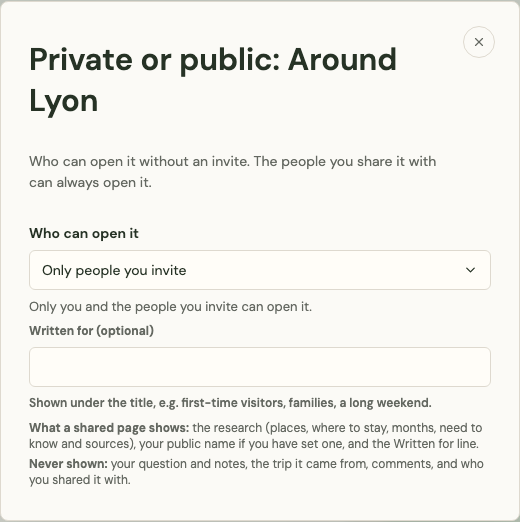
Choose Anyone with the link under Private or public:
- Open the deep dive, then open … in its top bar and select Private or public (a lock while it's private).
- Under Who can open it, choose Anyone with the link.
- Select Copy link and send it.
Anyone with the link can read it, signed in or not. It isn't shown in search. You can do this once the research has finished.
How do I make a deep dive public?
Choose Public under Who can open it. Anyone can read it, and Platix.io reviews it before it can show in search engines such as Google. The line under the choice says where it stands:
- "Anyone can read it. It's reviewed before it can show in search." while it waits for the review;
- "Anyone can read it, and it can show in search." once it's approved;
- "Anyone with the link can read it. It isn't shown in search." if it isn't approved.
Once it's shared, the … menu shows a globe instead of the lock.
What is the Written for line?
Written for (optional) is a few words, up to 80 characters, shown under the title on its page to say who it suits, for example first-time visitors, families or a long weekend. Type it before you choose who can open it, or change it later and select Save.
What does a public deep dive show?
Its page shows the deep dive as it is now:
- The research: the places and their highlights, Where to stay with its hotel picks, Getting around, Itineraries, Food, Shopping, the months researched for a month with their Before you go lists, Need to know, and the sources.
- Your edits: the text you changed, the places you added, and your own sections, tips, links, notes and photos. Sections you hid stay hidden.
- The credits under the title: By and your name when you have a public creator profile, the Written for line, and when it was researched.
What does a public deep dive never show?
- your question and your For you notes, including the For you lines on hotel picks;
- the trip or collection it came from, and any month researched for that trip's own dates;
- the comments and Platix.io's answers;
- who you've shared it with;
- your drafts, updates waiting for review and earlier versions.
Who can read it, and what can they do?
Anyone with the link can read it, signed in or not, and a public one can also be found through search once it's approved. People you invited by email who open the same link see the whole deep dive, with its comments, as before.
Other readers can't comment, ask Platix.io, use Ask about this, or research another month. They can:
- select Make it a trip on an itinerary to make it a trip of their own. Signed-out readers sign in first. See Make a trip from a deep dive itinerary.
- select Plan a trip to and the place's name at the top, which starts a new plan for the place from the home page.
- report a photo, when signed in, or select Report a problem. See Report a deep dive or a photo.
How do I make it private again?
Open Private or public and choose Only people you invite. Its page is gone: "Only people you invite can open it now. Its public page is gone." The people you invited keep their access. Trips that others already made from it stay theirs.