A deep dive is research Platix.io does for you about a city or a region before you plan a trip there. It's kept in your account, so you can come back to it, share it, and make a trip from it.
What is a deep dive?
A deep dive answers "what's worth it there, and how would I do it?" with sources. It has:
- Places worth going to, with their highlights, how long each takes to reach from your base when you have one, and Our pick;
- Where to stay, with areas to base yourself and hotels in each;
- Getting around, from arriving to moving about;
- Itineraries, from the shortest to the longest, which you can make into a trip;
- The month you're going, in a section named after it: the weather, holidays and events, crowds and what things cost;
- Need to know about the place and the country, and Before you go, a checklist from a few months ahead to when you arrive.
See Prepare for a trip with a deep dive for a tour.
How do I start a deep dive?
You need to be signed in. There are three ways:
- Explore chat, or a collection's chat in Explore: ask about a city or region as a whole, for example "What's worth seeing around Lyon in October?". See Use Explore chat.
- Trip chat: ask about an area the same way. The deep dive is linked to the trip: it's listed under Deep dives on the trip's overview, and when the trip has dates, its month covers the trip's own days. See Use trip chat.
- The Deep dives page: under Where are you thinking of going?, type a city, a region or a question about one, pick a Month if you like, and select Start a deep dive. Explore opens and its chat starts the research.
What happens while it researches?
The chat usually answers your question in a few sentences straight away, then shows a card with the research as it goes: Finding places, checking highlights and travel times, then Writing it up. The card says it takes about a minute. Keep chatting or exploring the map meanwhile; the deep dive appears in the card when it's ready, with how many places and sources it found, and Open.
If the research doesn't finish, the card says "This deep dive didn't finish." Select Try again.
Can I start more than one at a time?
No. While one of your deep dives is being researched or updated, the chat tells you so; ask again once it's ready.
If you ask again for the same place, base and month within 24 hours of its research, the chat opens the deep dive you already have instead of starting another.
How do I open my deep dives?
There are six ways:
- The account menu: select Deep dives to open your deep dives page, with every deep dive you made or that was shared with you.
- Explore: under your saved places, Your deep dives lists the newest three. Select one, or All deep dives for the rest.
- The home page box: select +, then A deep dive under Start from. See Use the home page conversation.
- The chat card: select Open on the deep dive's card in the chat where you started it.
- A trip's overview: under Deep dives, select one started in that trip's chat, or the one the trip was made from. See Make a trip from a deep dive itinerary.
- Emails: the button in an email about a deep dive, such as an invite, a comment or an update, opens it.
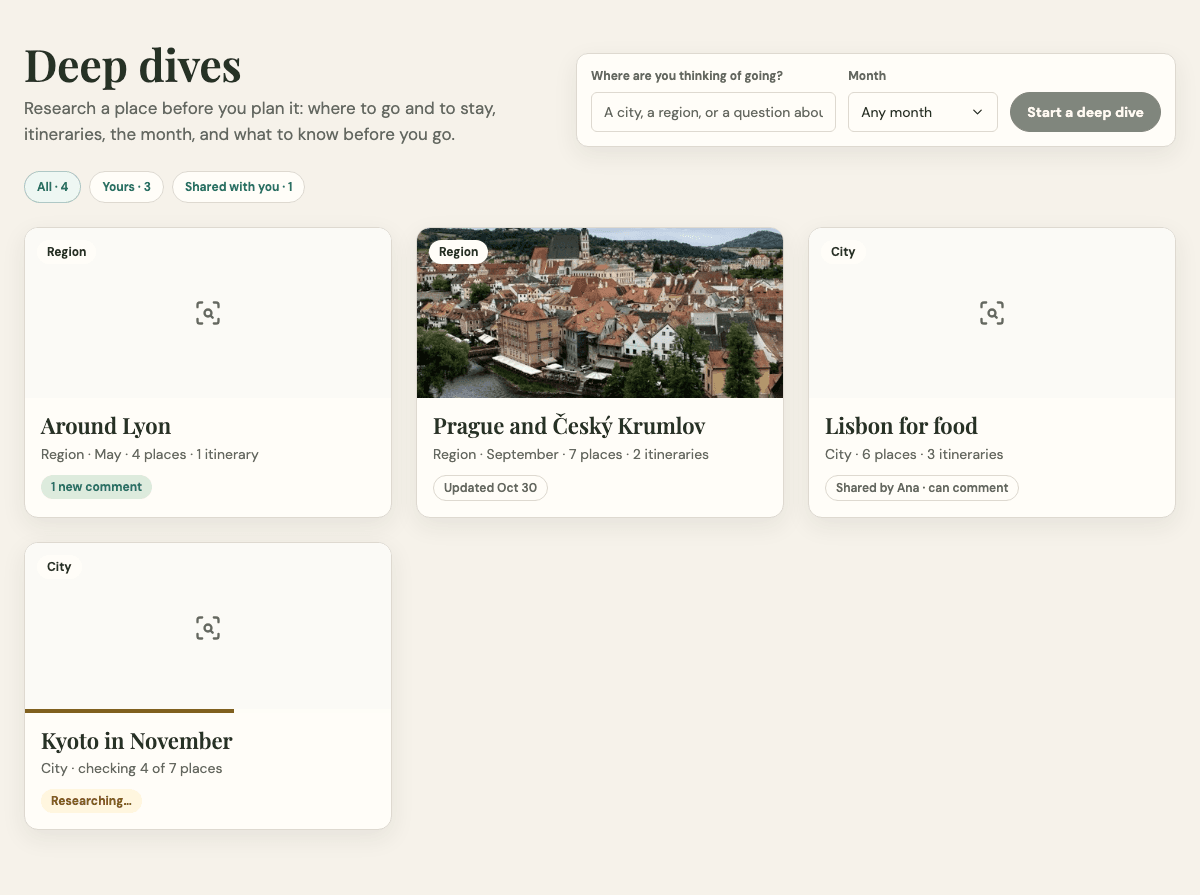
What do the cards on my deep dives page show?
Each card shows the deep dive's photo, whether it's a city or a region, its month, and how many places and itineraries it has. It also shows the one thing that matters most about it now, such as Researching…, Update waiting for you, 2 new comments or Shared by Maya · can comment. All, Yours, Shared with you and For a trip filter the cards. See Prepare for a trip with a deep dive for the full list.