When someone buys one of your premium trips, you get their name and email, unless they choose not to share them. They're your customers: you can tell them about updates to the trip and about your other travel content.
Where to find them
- Open Creator Studio > Buyers.
- Choose a premium trip to see only its buyers, or keep All premium trips.
- Select Download CSV to save the list as a spreadsheet: name, email, trip, purchase date, and order reference.
For your security, downloading the list needs a recent sign-in. If Platix asks you to sign in again, do so, and the download continues.
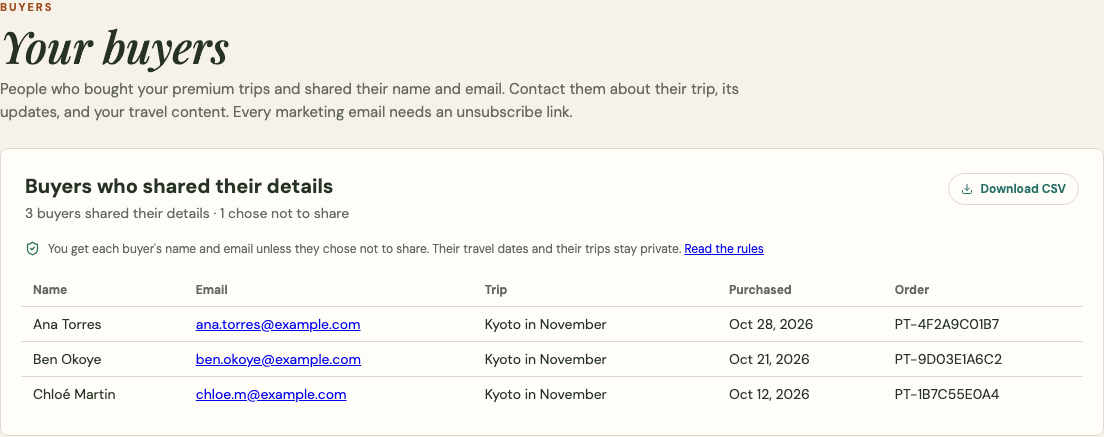
A premium trip's Sales & activity tab also links to that trip's buyers.
Why some buyers aren't listed
A buyer doesn't appear when they:
- chose not to share their details at checkout;
- stopped sharing later in their Purchases;
- were refunded, or the payment was disputed;
- deleted their Platix account.
The count at the top shows how many buyers chose not to share. Reviews are different: if you review trips, you never receive a traveler's identity or contact details.
The rules
You agreed to these in the seller terms (Section 12 of the Terms of Service):
- Contact buyers only about the trip they bought, its updates, and your own travel content and services.
- Include a working unsubscribe link in every marketing email, and honor it promptly.
- If a buyer asks you to stop contacting them, or to delete their details, do it.
- Keep the list secure. Never sell, rent, or share it, except with a service that sends your emails for you.
- Follow the anti-spam and privacy laws that apply to you and your buyers.
If buyers complain, or Platix believes these rules were broken, Platix can pause your access to buyer details. Your sales continue while access is paused.
When a buyer stops sharing
They disappear from your list in Platix right away. A copy you already downloaded stays with you, so honor any unsubscribe or deletion request that reaches you directly.