Once a trip sells, its itinerary is locked — permanently. Updates are how you keep a locked trip honest.
Why it is locked
Buyers paid for a specific plan. If creators could rewrite a sold trip, someone could buy a five-day Slovenia itinerary and later find it silently replaced. The lock makes what you sold stable.
It is not reversible, and unlisting the trip does not lift it.
Post an update
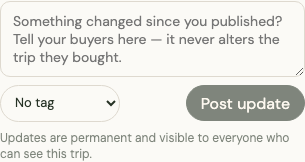
Open the trip and find the updates feed. Write what changed and post it. Updates are:
- Visible to every buyer, and on the public preview
- Permanent — they cannot be edited or deleted, like a correction notice
- Additive — they never alter the itinerary itself
Tag an update where it helps: Info, Warning, Closed, or Price change.
What is worth posting
> Warning — Hiša Franko (Day 4) now needs booking 4–6 months ahead, up from 6 weeks. Book right after buying this trip. Everything else is current as of today.
Good updates:
- A place closes, moves, or changes its booking lead time
- A road, pass, or ferry closes for the season
- A price changes enough to affect planning
- A seasonal confirmation — "checked in June, everything current"
That last one matters more than creators expect. A trip with a recent update reads as maintained; one with none reads as abandoned.
Publishing a revised version
For changes too large for an update — a different route, replaced destinations — publish a revised trip as a new listing, then post an update on the original pointing to it. We can grant your existing buyers free access to the revision, so nobody who bought the original is left behind.
The original stays available to its buyers permanently.